Exposing a Node.js App Over HTTP / HTTPS on a Subdomain in DDEV

Exposing a Node.js App Over 80/443 on a Subdomain in DDEV
Have you ever needed to run a separate Node.js application alongside your main site in DDEV, and serve it securely
over ports 80 and 443 on a custom subdomain? While DDEV has built-in mechanisms for exposing additional ports,
sometimes you need more control, especially if you want to expos it through a domain like
frontend.example.ddev.site instead of a port-specific URL. This is where Traefik, bundled with DDEV,
becomes incredibly powerful.
In this post, we’ll walk through how to configure DDEV and Traefik to proxy requests from a subdomain directly to your Node.js app on port 3000 within the DDEV web container.
Why Not Just Use web_extra_exposed_ports?
DDEV’s’ web_extra_exposed_ports feature is great for making your service accessible via a specific port
(e.g., (3000)). However, it doesn’t magically set up a subdomain for you to use on standard web ports (80/443).
If you want frontend.example.ddev.site to map to your Node.js app over HTTPS, you need a reverse proxy rule.
That’s where Traefik comes in.
Step 1: Update Your .ddev/config.yaml
In your project’s .ddev/config.yaml, define the project name and the additional hostname you want to use. For example:
name: example

additional_hostnames:
  - frontend.example
(Optional) You can still use web_extra_exposed_ports to expose the Node.js port if you want:
web_extra_exposed_ports:
  - name: node-app
    container_port: 3000
    http_port: 3000
    https_port: 3001
However, for a subdomain over standard web ports, the critical part is the next step with Traefik.
Step 2: Edit your project-level Traefik Configuration File
DDEV will generate a Traefik configuration file in your .ddev/traefik/config directory. You will need to edit this file and add configuration to it in the routers and services sections.
- Remove the
#ddev-generatedline at the top of the file.
Please note: as always, this means that the file now becomes your responsibility and you will need to update it manually if you add new services etc. This process should become easier once This issue gets finished and released.
- Find the
routerssection of the file, you need to add two routers: one for HTTP (port 80) and one for HTTPS (port 443), leaving intact the existing ones:
http:
  routers:
    # Router for HTTP (port 80)
    example-web-80-http-frontend:
      entrypoints:
        - http-80
      rule: Host(`frontend.example.ddev.site`)
      service: "example-web-3000"
      ruleSyntax: v3
      tls: false
      priority: 100

    # Router for HTTPS (port 443)
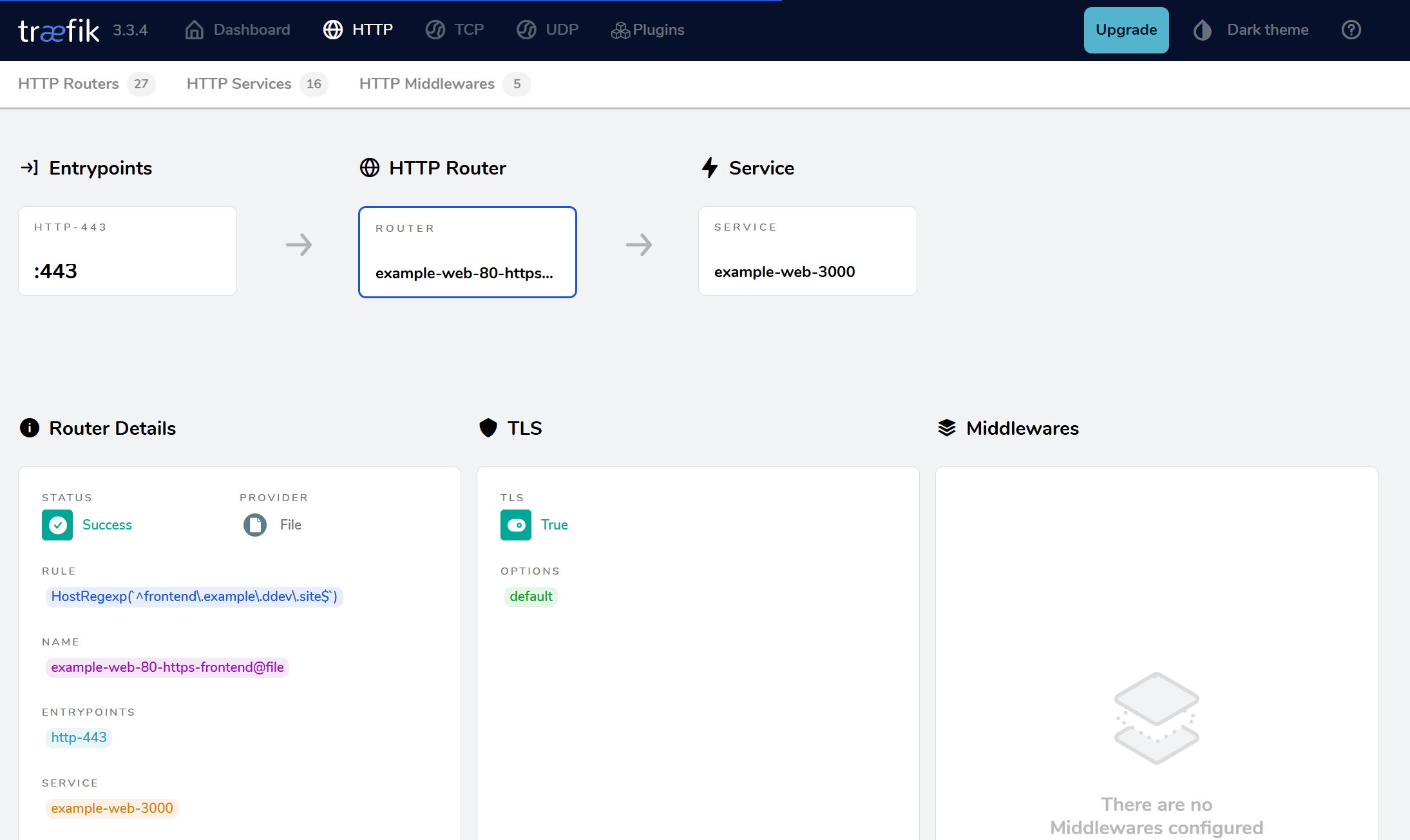
    example-web-80-https-frontend:
      entrypoints:
        - http-443
      rule: Host(`frontend.example.ddev.site`)
      service: "example-web-3000"
      ruleSyntax: v3
      tls: true
priority: 100- Find the
servicessection of the file: here you will add a service that points to the Node.js app on port 3000. Again, leave the already defined services in place.
http:
  services:
    # The custom service that routes to your Node app
    example-web-3000:
      loadbalancer:
        servers:
          - url: http://ddev-example-web:3000
Here’s what’s happening:
- Routers: Each router inspects incoming requests. If the hostname matches
frontend.example.ddev.site, it passes the request to theexample-web-3000service. - Service: Defines where to actually send the traffic. In this case,
http://ddev-example-web:3000is the internal address of the web container running on port 3000.
Step 3: Restart DDEV
Run:
ddev restartDDEV will pick up your new Traefik configuration, and you should now be able to access your Node.js application at:
ddev launch https://frontend.example.ddev.siteNo more messing with non-standard port numbers in your URLs!
Wrapping Up
By leveraging Traefik’s routing capabilities, you can expose any service running in the web container on standard HTTP/HTTPS ports and map it to a dedicated subdomain. This approach keeps your development environment clean, user-friendly, and closer to production-like URLs.
If you’ve followed these steps, your Node.js application will be served seamlessly over frontend.example.ddev.site.
Further Reading
Do You Have a Favorite DDEV Recipe? Contribute It!
We welcome community contributions to the DDEV blog and would love to have yours. The ddev.com repository has full details, and there’s even a training session on how to do it. It’s all just Markdown and we’ll help!